How do school plans and seats work?
A school plan pays for your students' access in one place, so they do not need to buy a pass. A student with a seat gets everything a pass gives: every mock, all practice sets and AI feedback.
- School Lite covers 4 students at a time.
- School Pro covers 10 students at a time.
- For more than 10 students, ask for a custom plan on the Schools page.
Prices are on the Schools page. Each purchase adds 30 days after the plan you have, and nothing renews by itself.
Set up the school. On your teacher dashboard, open School plan, give your school a name and tap Create school. Then buy a plan through the normal checkout.
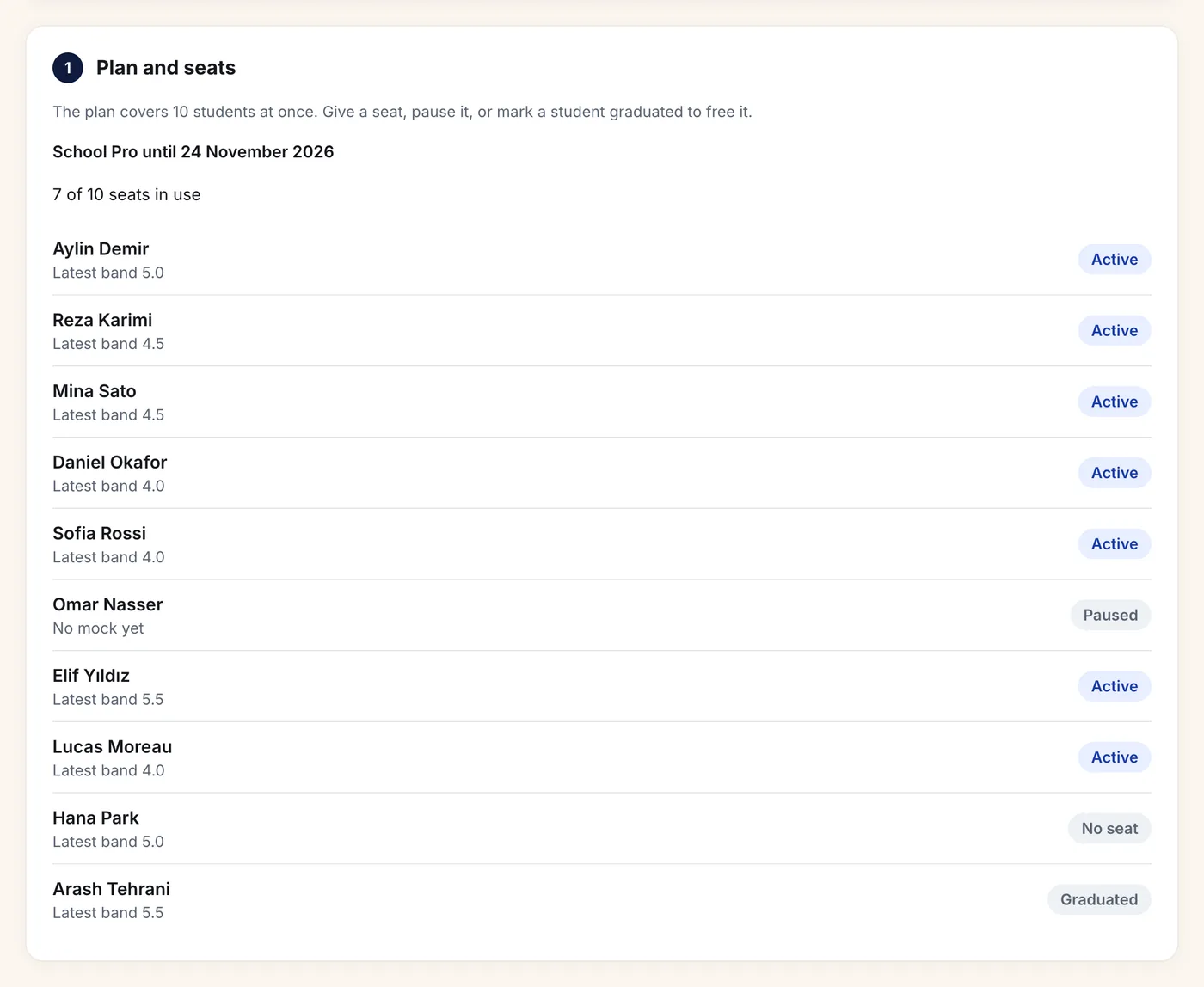
Give seats. Students appear under Students and seats once they join one of your school's classes. Set a student's seat to Active to give them access. Pausing a seat or marking a student Graduated frees it for someone else.
Add teachers. Add other teachers by the email of their Skorway teacher account. The school then sees their classes, and can give their students seats.
Your school's look. Upload your logo (PNG or JPEG, up to 200 KB) and pick a main color and an accent. They show on your students' class cards, the join and sign-in pages, and the emails your teachers' work sends.
To look around before you sign up, open the sample school. Every name and score there is made up.
Still stuck? Email help@skorway.com and a person replies within one working day.